
Windows has a feature called Kernel Mode Hardware-Enforced Stack Protection, which is supported on Intel chipsets with CET technology, or AMD chipsets which support shadow stacks. While this feature is meant to protect against certain vulnerabilities, there are certain drivers which are incompatible with this feature. The Guardant license driver which is used with uScope is one of these incompatible drivers.
You can read more about Hardware-Enforced Stack Protection in the following Microsoft article: https://learn.microsoft.com/en-us/windows-server/security/kernel-mode-hardware-stack-protection
Issue Description
If you install uScope and see an error message saying that a driver has been prevented from running due to Hardware-enforced Stack Protection, then you will need to disable this setting on your PC. This error message means that the driver for the license dongle cannot load on your PC, so uScope will always launch in Demo mode.
If you do not disable Hardware-enforced Stack Protection after seeing this error message when you install uScope, then your PC may crash when plugging in the physical license dongle.
If you see this error message, please follow the instructions below to disable Hardware-Enforced Stack Protection.
Disable Hardware-Enforced Stack Protection
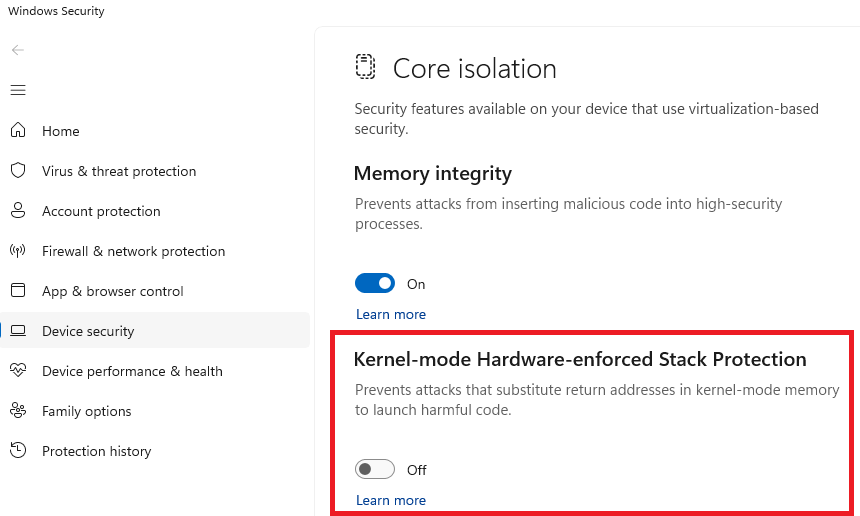
1. Click the Windows Start icon and search for "Core Isolation", press Enter
2. Disable the Kernel-mode Hardware-enforced Stack Protection toggle button
3. Restart your PC for the change to take effect
Please note, you will not be able to re-enable Stack Protection while you use uScope. It must remain off for the license driver to load.
Additional Notes
The incompatible driver is the driver for the Guardant license dongle, and this is due to the architecture of the license key. It cannot be made compatible with this Windows setting. For IT teams, we recommend creating an exception in your group policies for any PC's that will be running uScope, so that this setting can be disabled.